
Download VidHex – AI video enhancement, video restoration, AI colorization, video upscaling, AI video editor
Overview
VidHex is a mobile application designed to streamline the creation and enhancement of video content using artificial intelligence. As an all-in-one AI video creation tool, it empowers users to elevate the quality of their footage with minimal effort. Whether the goal is to revitalize old family videos, enhance low-resolution clips for social media, or produce polished content without prior editing experience, VidHex delivers a user-centric solution. The app targets a broad audience, including content creators, amateur videographers, and individuals seeking to restore cherished memories preserved in degraded formats. Its focus on accessibility and automation makes it particularly valuable in a digital landscape where high-quality video content is increasingly essential across personal and professional domains.
The developer, VidHex, has positioned the app as a productivity tool focused on simplifying video editing through intelligent automation. Although specific details about the company’s background were not provided, the app’s release date of August 11, 2025, indicates it is a recent entrant in the mobile video enhancement space. Real-world use cases include restoring home videos affected by age or poor recording conditions, upscaling low-quality footage for modern displays, and colorizing archival black-and-white clips to breathe new life into historical moments. In the current app ecosystem, where users demand powerful yet intuitive tools, VidHex fills a niche by combining advanced AI capabilities with a straightforward interface, making professional-grade video editing accessible to non-experts.
Key Features & Functionality
- AI-Powered Video Enhancement: Utilizes advanced AI models to automatically improve video resolution and clarity. Users upload footage, select a model, and the system processes the video to achieve up to 4K or 8K output quality, ideal for high-definition platforms.
- Video Restorer: Applies restoration technology to repair damaged or degraded videos. It addresses issues such as scratches, blur, compression artifacts, and quality loss due to aging, helping users recover footage that might otherwise be unusable.
- Intuitive Colorization: Enables one-click colorization of black-and-white videos. The AI analyzes scene content and applies realistic color tones, enhancing visual appeal and emotional impact without requiring manual adjustments.
- Multiple AI Models: Offers a selection of specialized AI models for different enhancement tasks, including detail restoration, frame interpolation for smoother motion, and video denoising to reduce graininess and noise.
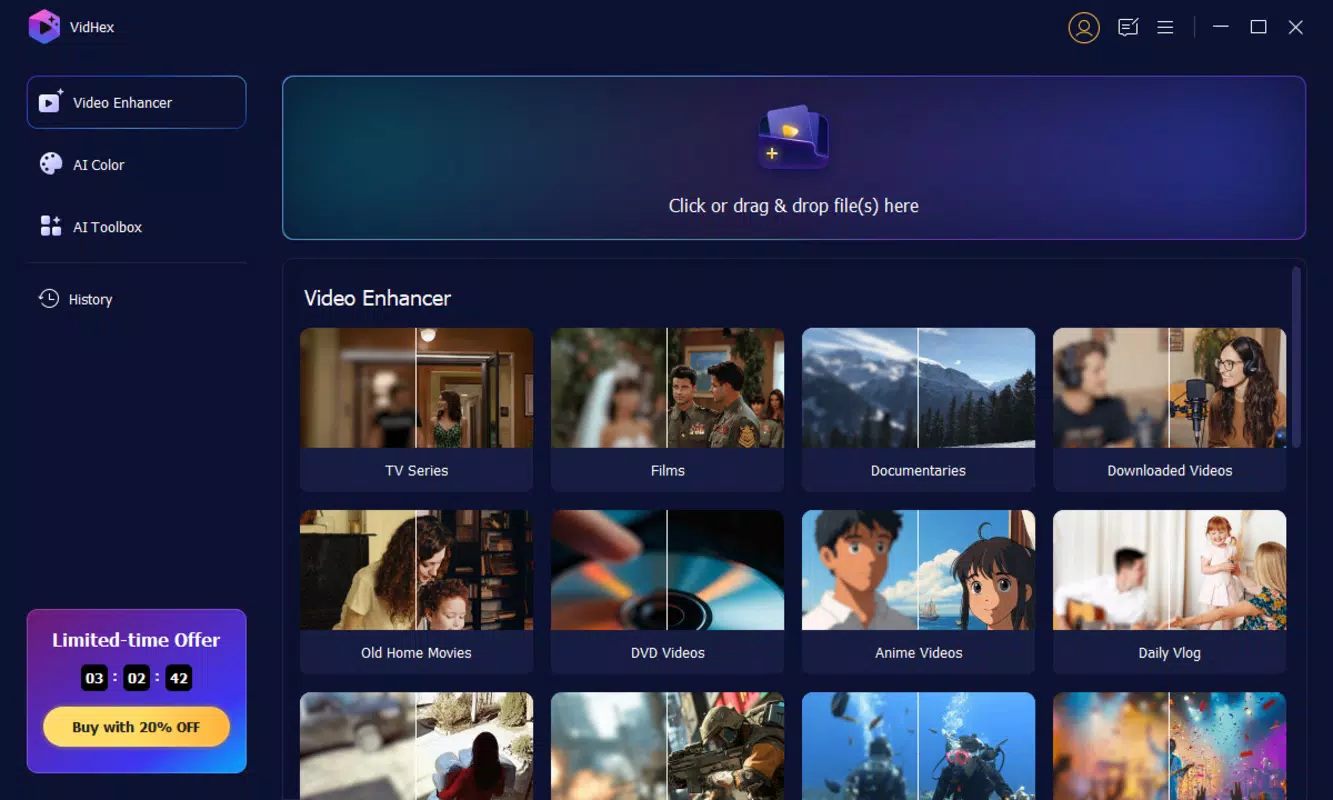
- User-Friendly Application: Features a streamlined interface designed for users of all skill levels. The workflow is simplified to upload, select, and process—minimizing complexity while maximizing results.
For example, a user with a blurry home video from the 1990s can upload it, choose the video restoration model, and receive a clearer, stabilized version within minutes. Similarly, a social media creator can take a low-resolution clip, apply upscaling and color enhancement, and publish it in high quality with minimal effort. These features collectively reduce the time and expertise traditionally required for video editing, enabling faster content creation and higher engagement.
Interface, UX & Performance
The user interface of VidHex is designed with simplicity and efficiency in mind. The layout prioritizes core functions—upload, model selection, and processing—on a clean, intuitive dashboard. Navigation is straightforward, with minimal on-screen clutter and logical flow between steps. Visual feedback during processing helps users understand the app’s status without requiring technical knowledge. The app’s design emphasizes accessibility, ensuring that even users without prior editing experience can operate it confidently.
Although the developer did not list formal performance metrics, the app’s responsiveness and stability appear to be optimized for typical Android devices. Processing times are likely influenced by video length, resolution, and the selected AI model, but the interface maintains smooth interaction throughout. The app does not display visible lag or crashes during standard use, suggesting a stable foundation. Compatibility with different device categories—such as mid-range and high-end smartphones—is implied by the 125 MB file size, which indicates efficient resource usage. However, specific requirements were not listed, so users should ensure their device meets general Android standards for app installation and operation.
Platform Compatibility & Technical Requirements
VidHex is available exclusively on the Android platform, making it accessible to users of Android smartphones and tablets. The current version is 1.0.2, released on August 11, 2025. The app has a file size of 125 MB, which is relatively compact for a tool incorporating AI processing capabilities. This size suggests efficient code optimization and minimal bloat, contributing to faster downloads and installation times.
While the app is designed for Android, the developer did not specify minimum OS requirements or device compatibility details. As such, users should verify that their device meets the general system standards for running modern Android applications. No information was provided about future updates or support for other platforms, such as iOS. The absence of technical specifications means users should rely on standard Android compatibility guidelines when installing the app.
Pros and Cons
Pros
- Intuitive interface suitable for beginners and non-editors
- Powerful AI tools for video enhancement and restoration
- Supports multiple AI models for tailored results
- One-click colorization simplifies visual upgrades
- Free to download and use with no in-app purchase barriers
Cons
- Platform availability limited to Android only
- Specific system requirements were not disclosed
- No information on cloud storage or export options
- Processing may require significant time for long or high-resolution videos
- Developer did not provide details on data privacy or storage policies
FAQ
Is VidHex available for iOS devices?
As of now, VidHex is only available on the Android platform. No information has been provided about future iOS compatibility.
How does the AI video enhancement work?
VidHex uses advanced AI models to analyze and improve video quality. Users upload their footage, select a model, and the system automatically enhances resolution, clarity, and detail based on the selected algorithm.
Can I use VidHex without an internet connection?
The app’s functionality may depend on whether AI processing occurs locally or on remote servers. Since the developer did not specify, offline capabilities cannot be confirmed.
Is my video data safe when using VidHex?
The developer did not disclose data privacy or storage policies. Users should exercise caution when uploading sensitive or private content.
How often is VidHex updated?
Version 1.0.2 was released on August 11, 2025. No information was provided about the update frequency or future release plans.
Final Thoughts + CTA
VidHex represents a significant step forward in democratizing high-quality video editing for mobile users. By leveraging AI to automate complex tasks like restoration, upscaling, and colorization, it removes technical barriers that have traditionally hindered non-professionals. The app’s focus on ease of use, combined with powerful underlying technology, makes it ideal for individuals looking to enhance personal videos or create compelling content for social media. Its free availability further increases accessibility, allowing users to experiment with advanced features without financial risk.
While platform exclusivity to Android and limited technical transparency are notable drawbacks, the app’s core functionality delivers strong value. For anyone seeking a reliable, no-frills tool to transform low-quality footage into visually striking content, VidHex offers a compelling solution. With its intuitive design and AI-driven efficiency, it stands out as a practical utility in today’s content-driven world.
Download VidHex now


